


Hugging Face (Notebook)#
Joseph Hellerstein
Extensive material is taken from “Hugging Face Transformers” by Ben Newman (Stanford NLP)
This notebook will give an introduction to the Hugging Face Transformers Python library and some common patterns that you can use to take advantage of it. It is most useful for using or fine-tuning pretrained transformer models for your projects.
Hugging Face provides access to models (both the code that implements them and their pre-trained weights), model-specific tokenizers, as well as pipelines for common NLP tasks, and datasets and metrics in a separate datasets package. It has implementations in PyTorch, Tensorflow, and Flax (though we’ll be using the PyTorch versions here!)
We’re going to go through a few use cases:
Overview of Tokenizers and Models
Finetuning - for your own task. We’ll use a sentiment-classification example.
Chris spoke about a few main project types in last Thursday’s lecture:
Applying an existing pre-trained model to a new application or task and explore how to approach/solve it
Implementing a new or complex neural architecture and demonstrate its performance on some data
Analyzing the behavior of a model: how it represents linguistic knowledge or what kinds of phenomena it can handle or errors that it makes
Of these, transformers will be the most help for 1. and for 3. (You also can use it to define your own model architectures, but it’s a bit tricky and we won’t be covering it here.)
Here are additional resources introducing the library that were used to make this tutorial:
-
Clear documentation
Tutorials, walk-throughs, and example notebooks
List of available models
-
Students have FREE access through the Stanford Library!
Setup#
try:
    from pypdf import PdfReader
except:
    !pip install pypdf
    from pypdf import PdfReader
import requests
from io import BytesIO
# Ensure packages are present
import importlib.util
import subprocess
import sys

def ensure_packages(*packages):
    """
    Ensure each package is installed. Accepts either plain names
    ('numpy') or 'import_name:pip_name' pairs when they differ
    (e.g. 'PIL:pillow', 'cv2:opencv-python').

    """
    to_install = []
    for pkg in packages:
        import_name, _, pip_name = pkg.partition(":")
        pip_name = pip_name or import_name
        if importlib.util.find_spec(import_name) is None:
            to_install.append(pip_name)


    if to_install:
        subprocess.check_call([sys.executable, "-m", "pip", "install", "-q", *to_install])
ensure_packages("torch", "torchvision", "transformers", "datasets", "ipywidgets", "tqdm")
from collections import defaultdict, Counter
import json

from matplotlib import pyplot as plt # type: ignore
import os
import numpy as np  # type: ignore
import torch  # type: ignore
from transformers import pipeline # type: ignore
IS_DISPLAY_LARGE = False # Don't display large data outputs
os.environ["KERAS_BACKEND"] = "torch"
import keras
print(keras.backend.backend())
torch
Transformers: A brief review#
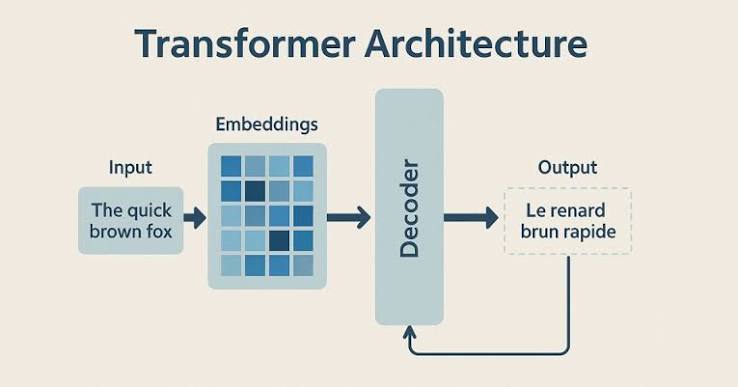
[From Claude]
A transformer is a neural network architecture built around a mechanism called attention, which lets the model weigh how much every word (or token) in a sequence relates to every other word, regardless of how far apart they are. Before transformers, models like RNNs processed text one word at a time in order, which made it hard to capture long-range relationships efficiently. Transformers instead process the whole sequence at once, using attention to directly connect any token to any other token in a single step. A few key parts:
Tokens & embeddings — input text is split into tokens and converted into numerical vectors. Self-attention — each token looks at every other token and computes how relevant they are to each other, producing a weighted blend of information. Feed-forward layers — the attended information is further transformed to extract features. Stacking — these attention + feed-forward blocks are stacked many times (layers), letting the model build increasingly abstract representations.
This architecture (introduced in the 2017 paper “Attention Is All You Need”) is the foundation for most modern LLMs — GPT, Claude, Llama, BERT, and so on — as well as many vision and audio models. This paper provides a principled introduction to transformers.
What is Hugging Face?#
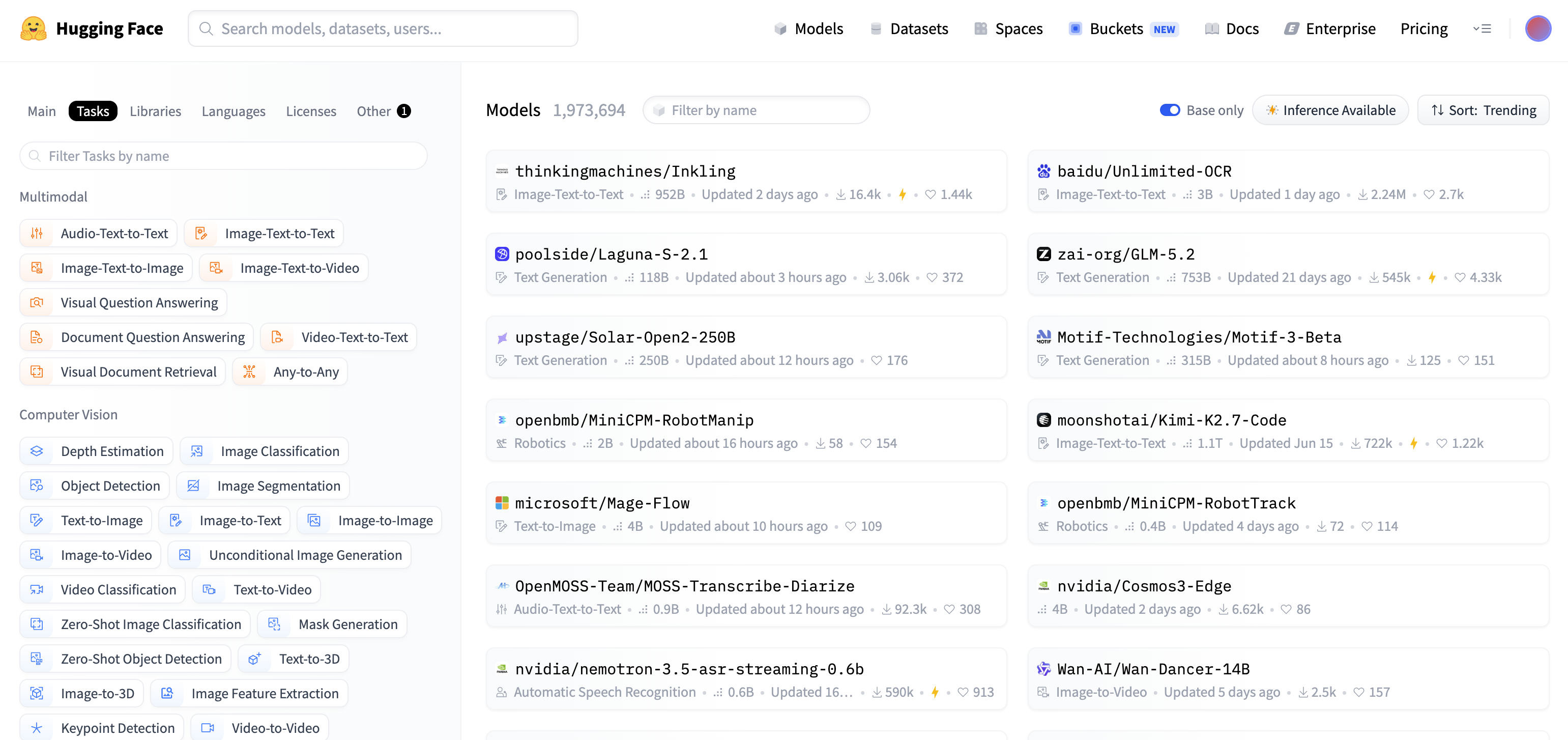
[From Claude]
Hugging Face is a company and open-source platform that’s become one of the central hubs for machine learning, especially natural language processing and generative AI.
Here’s what it’s known for:
The Hub — a website (huggingface.co) where people share and download pre-trained AI models, datasets, and demo apps (“Spaces”). It hosts hundreds of thousands of models, including open-weight versions of things like Llama, Mistral, Stable Diffusion, and many others.
The transformers library — a widely used Python library that makes it easy to load and run state-of-the-art ML models with just a few lines of code. This was arguably their original claim to fame and is still core to a lot of ML tooling today.
Other tools — libraries like datasets, diffusers (for image generation models), tokenizers, and accelerate for training/fine-tuning models efficiently.
Community and openness — Hugging Face has positioned itself as a champion of open-source AI, in contrast to more closed approaches from companies like OpenAI or Google. Researchers, hobbyists, and companies use it to publish and collaborate on models.
It started out (originally, believe it or not) as a chatbot app for teenagers before pivoting to become an infrastructure/tooling company for the broader ML community. It’s now used constantly in both research and industry as a place to find, share, and experiment with models.
Hugging Face Ecosystem#
The Hub (website for sharing ML artifacts)
Models — pre-trained weights (LLMs, vision, audio)
Datasets — ready-to-use data (text, image, audio)
Spaces — hosted demo apps (Gradio / Streamlit)
Open-source libraries (Python tools to build with the Hub)
transformers — load and run models
diffusers — image / audio generation
datasets — load and process datasets
tokenizers — fast text tokenization
accelerate — easy multi-GPU / distributed training
from transformers import BertTokenizer, BertForSequenceClassification
from transformers import pipeline

model = BertForSequenceClassification.from_pretrained("ahmedrachid/FinancialBERT-Sentiment-Analysis",num_labels=3)
tokenizer = BertTokenizer.from_pretrained("ahmedrachid/FinancialBERT-Sentiment-Analysis")

nlp = pipeline("sentiment-analysis", model=model, tokenizer=tokenizer)

sentences = ["Operating profit rose to EUR 13.1 mn from EUR 8.7 mn in the corresponding period in 2007 representing 7.7 % of net sales.",
             "Bids or offers include at least 1,000 shares and the value of the shares must correspond to at least EUR 4,000.",
             "Raute reported a loss per share of EUR 0.86 for the first half of 2009 , against EPS of EUR 0.74 in the corresponding period of 2008.",
             ]
results = nlp(sentences)
print(results)
Warning: You are sending unauthenticated requests to the HF Hub. Please set a HF_TOKEN to enable higher rate limits and faster downloads.
WARNING:huggingface_hub.utils._http:Warning: You are sending unauthenticated requests to the HF Hub. Please set a HF_TOKEN to enable higher rate limits and faster downloads.
[{'label': 'positive', 'score': 0.9998133778572083},
 {'label': 'neutral', 'score': 0.9997822642326355},
 {'label': 'negative', 'score': 0.9877365231513977}]
[{'label': 'positive', 'score': 0.9998133778572083},
{'label': 'neutral', 'score': 0.9997822642326355},
{'label': 'negative', 'score': 0.9877365231513977}]
results = nlp(sentences)
print(results)
[{'label': 'positive', 'score': 0.9998133778572083}, {'label': 'neutral', 'score': 0.9997822642326355}, {'label': 'negative', 'score': 0.9877365231513977}]
A tour of the Hugging Face hub#
The tour starts here.
Model-Tokenizer Pattern#
We’re going to start off with a common usage pattern for Hugging Face Transformers, using the example of Sentiment Analysis.
First, find a model on the hub. Anyone can upload their model for other people to use. (I’m using a sentiment analysis model from this paper).
Then, there are two objects that need to be initialized - a tokenizer, and a model
Tokenizer converts strings to lists of vocabulary ids that the model requires
Model takes the vocabulary ids and produces a prediction
 From https://huggingface.co/course/chapter2/2?fw=pt
def print_encoding(model_inputs, indent=4):
    indent_str = " " * indent
    print("{")
    for k, v in model_inputs.items():
        print(indent_str + k + ":")
        print(indent_str + indent_str + str(v))
    print("}")
from transformers import AutoTokenizer, AutoModelForSequenceClassification

# Initialize the tokenizer
tokenizer = AutoTokenizer.from_pretrained("siebert/sentiment-roberta-large-english")
# Initialize the model
model = AutoModelForSequenceClassification.from_pretrained("siebert/sentiment-roberta-large-english")
Warning: You are sending unauthenticated requests to the HF Hub. Please set a HF_TOKEN to enable higher rate limits and faster downloads.
WARNING:huggingface_hub.utils._http:Warning: You are sending unauthenticated requests to the HF Hub. Please set a HF_TOKEN to enable higher rate limits and faster downloads.
inputs = "I'm excited to learn about Hugging Face Transformers!"
tokenized_inputs = tokenizer(inputs, return_tensors="pt")
outputs = model(**tokenized_inputs)

labels = ['NEGATIVE', 'POSITIVE']
prediction = torch.argmax(outputs.logits)


print("Input:")
print(inputs)
print()
print("Tokenized Inputs:")
print_encoding(tokenized_inputs)
print()
print("Model Outputs:")
print(outputs)
print()
print(f"The prediction is {labels[prediction]}")
Input:
I'm excited to learn about Hugging Face Transformers!

Tokenized Inputs:
{
    input_ids:
        tensor([[    0,   100,   437,  2283,     7,  1532,    59, 30581,  3923, 12346,
         34379,   328,     2]])
    attention_mask:
        tensor([[1, 1, 1, 1, 1, 1, 1, 1, 1, 1, 1, 1, 1]])
}

Model Outputs:
SequenceClassifierOutput(loss=None, logits=tensor([[-3.7605,  2.9262]], grad_fn=<AddmmBackward0>), hidden_states=None, attentions=None)

The prediction is POSITIVE
Pipeline Pattern#
Hugging face pipelines provide a simple way to do common tasks.
Sentiment analysis#
There are some standard NLP tasks like sentiment classification or question answering where there are already pre-trained (and fine-tuned!) models available through Hugging Face Transformer’s Pipeline interface.
For your projects, you likely won’t be using it too much, but it’s still worth knowing about!
Here’s an example with Sentiment Analysis:
from transformers import pipeline

sentiment_analysis = pipeline("sentiment-analysis", model="siebert/sentiment-roberta-large-english")  # type: ignore
You can run the pipeline by just calling it on a string
sentiment_analysis("Hugging Face Transformers is really cool!")
[{'label': 'POSITIVE', 'score': 0.998448371887207}]
Or on a list of strings:
sentiment_analysis(["I didn't know if I would like Hákarl, but it turned out pretty good.",
                    "I didn't know if I would like Hákarl, and it was just as bad as I'd heard."])
[{'label': 'POSITIVE', 'score': 0.9988769888877869},
 {'label': 'NEGATIVE', 'score': 0.9994940757751465}]
Simple Summarization#
from transformers import pipeline
summarizer = pipeline("text-generation", model="sshleifer/distilbart-cnn-12-6")
abstract = """
Abstract Artificial neural networks (ANNs) have achieved significant success in
tackling classical and modern machine learning problems. As learning problems
grow in scale and complexity, and expand into multi-disciplinary territory, a more
modular approach for scaling ANNs will be needed. Modular neural networks (MNNs) are neural networks that embody the concepts and principles of modu-
larity. MNNs adopt a large number of different techniques for achieving modu-
larization.
"""
result = summarizer(abstract)
print(result)
[transformers] Please make sure the generation config includes `forced_bos_token_id=0`.
[transformers] BartForCausalLM LOAD REPORT from: sshleifer/distilbart-cnn-12-6
Key                                                       | Status     |  |
----------------------------------------------------------+------------+--+-
model.encoder.layers.{0...11}.self_attn.k_proj.bias       | UNEXPECTED |  |
model.encoder.layers.{0...11}.self_attn.v_proj.bias       | UNEXPECTED |  |
model.encoder.layers.{0...11}.fc1.bias                    | UNEXPECTED |  |
model.encoder.layers.{0...11}.self_attn.out_proj.weight   | UNEXPECTED |  |
model.encoder.layers.{0...11}.self_attn_layer_norm.weight | UNEXPECTED |  |
model.encoder.layers.{0...11}.self_attn.v_proj.weight     | UNEXPECTED |  |
model.encoder.layers.{0...11}.final_layer_norm.bias       | UNEXPECTED |  |
model.encoder.layers.{0...11}.fc2.weight                  | UNEXPECTED |  |
model.encoder.layers.{0...11}.fc1.weight                  | UNEXPECTED |  |
model.encoder.layers.{0...11}.self_attn.k_proj.weight     | UNEXPECTED |  |
model.encoder.layers.{0...11}.fc2.bias                    | UNEXPECTED |  |
model.encoder.layers.{0...11}.self_attn.out_proj.bias     | UNEXPECTED |  |
model.encoder.layers.{0...11}.self_attn.q_proj.bias       | UNEXPECTED |  |
model.encoder.layers.{0...11}.self_attn_layer_norm.bias   | UNEXPECTED |  |
model.encoder.layers.{0...11}.final_layer_norm.weight     | UNEXPECTED |  |
model.encoder.layers.{0...11}.self_attn.q_proj.weight     | UNEXPECTED |  |
model.encoder.embed_positions.weight                      | UNEXPECTED |  |
model.encoder.layernorm_embedding.bias                    | UNEXPECTED |  |
model.encoder.layernorm_embedding.weight                  | UNEXPECTED |  |
final_logits_bias                                         | UNEXPECTED |  |
model.shared.weight                                       | UNEXPECTED |  |
model.encoder.embed_tokens.weight                         | UNEXPECTED |  |

Notes:
- UNEXPECTED:	can be ignored when loading from different task/architecture; not ok if you expect identical arch.
[transformers] Passing `generation_config` together with generation-related arguments=({'max_length'}) is deprecated and will be removed in future versions. Please pass either a `generation_config` object OR all generation parameters explicitly, but not both.
[transformers] Ignoring clean_up_tokenization_spaces=True for BPE tokenizer RobertaTokenizer. The clean_up_tokenization post-processing step is designed for WordPiece tokenizers and is destructive for BPE (it strips spaces before punctuation). Set clean_up_tokenization_spaces=False to suppress this warning, or set clean_up_tokenization_spaces_for_bpe_even_though_it_will_corrupt_output=True to force cleanup anyway.
[{'generated_text': '\nAbstract Artificial neural networks (ANNs) have achieved significant success in\ntackling classical and modern machine learning problems. As learning problems\ngrow in scale and complexity, and expand into multi-disciplinary territory, a more\nmodular approach for scaling ANNs will be needed. Modular neural networks (MNNs) are neural networks that embody the concepts and principles of modu-\nlarity. MNNs adopt a large number of different techniques for achieving modu-\nlarization.\nopixixixxxxXxxlaylaylay ExtrafrafrafstststowsowsowsOWOWOWake Extrelaylayopopiiiiii'}]
Summarizing a PDF#
The foreging isn’t much text. We’d like to summarize an entire PDF. There are two challenges:
Making the PDF into plain text
Chunking the input since the AI models cannot accept all the text at once.
Converting a PDF to text#
import requests
from io import BytesIO

#file_id = "FILE_ID_HERE"  # extracted from the share link
#url = f"https://drive.google.com/uc?export=download&id={file_id}"
URL = "https://raw.githubusercontent.com/joseph-hellerstein/ai_in_practice/main/pdfs/10.3389_fphys.2015.00383.pdf"

response = requests.get(URL)
response.raise_for_status()

pdf_stream = BytesIO(response.content)
reader = PdfReader(pdf_stream)
from pypdf import PdfReader
from transformers import pipeline

# Assume `reader` already exists from one of the earlier steps
# reader = PdfReader(pdf_path_or_stream)

# 1. Extract all text from the PDF
pdf_text = ""
for page in reader.pages:
    extracted = page.extract_text()
    if extracted:  # some pages (e.g. scanned/image pages) return None or empty
        pdf_text += extracted + "\n"

print(f"Extracted {len(pdf_text)} characters")
Extracted 86639 characters
WARNING:pypdf.generic._data_structures:Multiple definitions in dictionary at byte 0x30eba for key /MediaBox
WARNING:pypdf.generic._data_structures:Multiple definitions in dictionary at byte 0x310cb for key /MediaBox
WARNING:pypdf.generic._data_structures:Multiple definitions in dictionary at byte 0x31331 for key /MediaBox
WARNING:pypdf.generic._data_structures:Multiple definitions in dictionary at byte 0x31572 for key /MediaBox
WARNING:pypdf.generic._data_structures:Multiple definitions in dictionary at byte 0x31863 for key /MediaBox
WARNING:pypdf.generic._data_structures:Multiple definitions in dictionary at byte 0x31a49 for key /MediaBox
WARNING:pypdf.generic._data_structures:Multiple definitions in dictionary at byte 0x31c17 for key /MediaBox
WARNING:pypdf.generic._data_structures:Multiple definitions in dictionary at byte 0x31e9d for key /MediaBox
WARNING:pypdf.generic._data_structures:Multiple definitions in dictionary at byte 0x320fb for key /MediaBox
WARNING:pypdf.generic._data_structures:Multiple definitions in dictionary at byte 0x322f9 for key /MediaBox
WARNING:pypdf.generic._data_structures:Multiple definitions in dictionary at byte 0x32542 for key /MediaBox
WARNING:pypdf.generic._data_structures:Multiple definitions in dictionary at byte 0x3272b for key /MediaBox
WARNING:pypdf.generic._data_structures:Multiple definitions in dictionary at byte 0x3288c for key /MediaBox
WARNING:pypdf.generic._data_structures:Multiple definitions in dictionary at byte 0x329e5 for key /MediaBox
WARNING:pypdf.generic._data_structures:Multiple definitions in dictionary at byte 0x32b66 for key /MediaBox
Summarization with chunking#
# 1. Set up the summarizer
summarizer = pipeline("text-generation", model="sshleifer/distilbart-cnn-12-6")

# 2. Chunk the text (models have a ~1024 token limit)
def chunk_text(text, max_words=800):
    words = text.split()
    for i in range(0, len(words), max_words):
        yield " ".join(words[i:i + max_words])

# 3. Summarize each chunk
SUMMARIES = []
for chunk in chunk_text(pdf_text):
    result = summarizer(chunk, max_length=130, min_length=30, do_sample=False)
    SUMMARIES.append(result[0]['generated_text'])
[transformers] BartForCausalLM LOAD REPORT from: sshleifer/distilbart-cnn-12-6
Key                                                       | Status     |  |
----------------------------------------------------------+------------+--+-
model.encoder.layers.{0...11}.fc1.bias                    | UNEXPECTED |  |
model.encoder.layers.{0...11}.self_attn_layer_norm.weight | UNEXPECTED |  |
model.encoder.layers.{0...11}.fc2.bias                    | UNEXPECTED |  |
model.encoder.layers.{0...11}.fc1.weight                  | UNEXPECTED |  |
model.encoder.layers.{0...11}.self_attn.out_proj.bias     | UNEXPECTED |  |
model.encoder.layers.{0...11}.self_attn.out_proj.weight   | UNEXPECTED |  |
model.encoder.layers.{0...11}.final_layer_norm.weight     | UNEXPECTED |  |
model.encoder.layers.{0...11}.self_attn_layer_norm.bias   | UNEXPECTED |  |
model.encoder.layers.{0...11}.self_attn.q_proj.bias       | UNEXPECTED |  |
model.encoder.layers.{0...11}.self_attn.q_proj.weight     | UNEXPECTED |  |
model.encoder.layers.{0...11}.final_layer_norm.bias       | UNEXPECTED |  |
model.encoder.layers.{0...11}.self_attn.v_proj.weight     | UNEXPECTED |  |
model.encoder.layers.{0...11}.self_attn.v_proj.bias       | UNEXPECTED |  |
model.encoder.layers.{0...11}.self_attn.k_proj.weight     | UNEXPECTED |  |
model.encoder.layers.{0...11}.self_attn.k_proj.bias       | UNEXPECTED |  |
model.encoder.layernorm_embedding.bias                    | UNEXPECTED |  |
final_logits_bias                                         | UNEXPECTED |  |
model.encoder.embed_tokens.weight                         | UNEXPECTED |  |
model.encoder.layers.{0...11}.fc2.weight                  | UNEXPECTED |  |
model.encoder.layernorm_embedding.weight                  | UNEXPECTED |  |
model.shared.weight                                       | UNEXPECTED |  |
model.encoder.embed_positions.weight                      | UNEXPECTED |  |

Notes:
- UNEXPECTED:	can be ignored when loading from different task/architecture; not ok if you expect identical arch.
[transformers] Passing `generation_config` together with generation-related arguments=({'min_length', 'max_length', 'do_sample'}) is deprecated and will be removed in future versions. Please pass either a `generation_config` object OR all generation parameters explicitly, but not both.
Print the summary#
# Summarize the introduction
introduction_pos = SUMMARIES[0].index("INTRODUCTION")
print(SUMMARIES[0][introduction_pos:])
INTRODUCTION Pathway Analysis (PA), also known as functional enrichment analysis, is fast becoming one of the foremost tools of Omics research. The main purpose of PA tools is to analyze data obtained from high-throughput technologies, detecting relevant groups of related genes that are altered in case samples in comparison to a control. In this manner, PA methods seek to overcome the problem of interpreting overwhelmingly large lists of important, but isolated genes detached of biological context, which are the main output of most basic high-throughput data analysis, as differential expression analysis. PA methods provide meaning to experimental high-throughput biological data (HTBD) thus facilitating interpretation and subsequent hypothesis generation. This has been achieved on the basis of coupling existing biological knowledge from databases with statistical testing, mathematical analyses and computational algorithms. PA methods possess a broad range of applications in physiological and biomedical research. These methods aim is to help the researcher discover what biological themes, and which biomolecules, are crucial to understand the phenomena under study, given the HTBD analyzed. In turn, the clues that provides a PA enables the researcher to generate new hypothesis, design subsequent experiments, and further validate their findings. PA methods have helped researchers in the identification of the biological roles of candidate genes, selected to design new therapies for cancer, circumventing collateral damage to healthy cells (Folger et al., 2011). Another instance is the d etermination of similarity and dissimilarity, at a molecular level, between sample groups, as in the comparison between cell lines and tumor samples ( Heiser et al., 2012). Such kind of analyses may h elp researchers understand heterogeneity phenomena in different research contexts. Yet another example is the use of PA methods to examine the biological function of gene modules, not yet García-Campos et al. Pathway Analysis: State of the Art validated sets of genes thought to be related between them, a s in the analysis of genes that fluctuate in response to natural variations, like seasons ( Dopico et al., 2015 ). Although all these applications have succeeded in specific goals, the use of PA methods may be as wide and complex as the creativity of their users. However, despite the recent spotlight and wide usage PA has gained in recent years, overlooking of the key elements that compose these methods is also common. Often users neglect details concerning the proper application of the methods, their caveats, and the existence of different PA methods. In this reg ard it is essential to review the foundations and diversity of th e PA methods, and acknowledge their capabilities and caveats. There are several elements needed to perform a PA. First of all, quantitative data representative of the cell biology i s needed. This information is generated through the use of Omi c technologies as: RNA-microarrays, tandem mass spectrometry
STOP
Transfer Learning#
# Avoid problems with dependencies in the datasets package
!pip install -U datasets --break-system-packages
Requirement already satisfied: datasets in /usr/local/lib/python3.12/dist-packages (5.0.1)
Requirement already satisfied: filelock in /usr/local/lib/python3.12/dist-packages (from datasets) (3.29.7)
Requirement already satisfied: numpy>=1.17 in /usr/local/lib/python3.12/dist-packages (from datasets) (2.0.2)
Requirement already satisfied: pyarrow>=21.0.0 in /usr/local/lib/python3.12/dist-packages (from datasets) (25.0.0)
Requirement already satisfied: dill<0.4.2,>=0.3.0 in /usr/local/lib/python3.12/dist-packages (from datasets) (0.3.8)
Requirement already satisfied: pandas in /usr/local/lib/python3.12/dist-packages (from datasets) (2.2.2)
Requirement already satisfied: requests>=2.32.2 in /usr/local/lib/python3.12/dist-packages (from datasets) (2.32.4)
Requirement already satisfied: httpx<1.0.0 in /usr/local/lib/python3.12/dist-packages (from datasets) (0.28.1)
Requirement already satisfied: tqdm>=4.66.3 in /usr/local/lib/python3.12/dist-packages (from datasets) (4.67.3)
Requirement already satisfied: xxhash in /usr/local/lib/python3.12/dist-packages (from datasets) (3.8.1)
Requirement already satisfied: multiprocess<0.70.20 in /usr/local/lib/python3.12/dist-packages (from datasets) (0.70.16)
Requirement already satisfied: fsspec<=2026.6.0,>=2023.1.0 in /usr/local/lib/python3.12/dist-packages (from fsspec[http]<=2026.6.0,>=2023.1.0->datasets) (2025.3.0)
Requirement already satisfied: huggingface-hub<2.0,>=0.25.0 in /usr/local/lib/python3.12/dist-packages (from datasets) (1.23.0)
Requirement already satisfied: packaging in /usr/local/lib/python3.12/dist-packages (from datasets) (26.2)
Requirement already satisfied: pyyaml>=5.1 in /usr/local/lib/python3.12/dist-packages (from datasets) (6.0.3)
Requirement already satisfied: aiohttp!=4.0.0a0,!=4.0.0a1 in /usr/local/lib/python3.12/dist-packages (from fsspec[http]<=2026.6.0,>=2023.1.0->datasets) (3.14.1)
Requirement already satisfied: anyio in /usr/local/lib/python3.12/dist-packages (from httpx<1.0.0->datasets) (4.14.2)
Requirement already satisfied: certifi in /usr/local/lib/python3.12/dist-packages (from httpx<1.0.0->datasets) (2026.6.17)
Requirement already satisfied: httpcore==1.* in /usr/local/lib/python3.12/dist-packages (from httpx<1.0.0->datasets) (1.0.9)
Requirement already satisfied: idna in /usr/local/lib/python3.12/dist-packages (from httpx<1.0.0->datasets) (3.18)
Requirement already satisfied: h11>=0.16 in /usr/local/lib/python3.12/dist-packages (from httpcore==1.*->httpx<1.0.0->datasets) (0.16.0)
Requirement already satisfied: click<9.0.0,>=8.4.2 in /usr/local/lib/python3.12/dist-packages (from huggingface-hub<2.0,>=0.25.0->datasets) (8.4.2)
Requirement already satisfied: hf-xet<2.0.0,>=1.5.1 in /usr/local/lib/python3.12/dist-packages (from huggingface-hub<2.0,>=0.25.0->datasets) (1.5.1)
Requirement already satisfied: typing-extensions>=4.1.0 in /usr/local/lib/python3.12/dist-packages (from huggingface-hub<2.0,>=0.25.0->datasets) (4.16.0)
Requirement already satisfied: charset_normalizer<4,>=2 in /usr/local/lib/python3.12/dist-packages (from requests>=2.32.2->datasets) (3.4.9)
Requirement already satisfied: urllib3<3,>=1.21.1 in /usr/local/lib/python3.12/dist-packages (from requests>=2.32.2->datasets) (2.5.0)
Requirement already satisfied: python-dateutil>=2.8.2 in /usr/local/lib/python3.12/dist-packages (from pandas->datasets) (2.9.0.post0)
Requirement already satisfied: pytz>=2020.1 in /usr/local/lib/python3.12/dist-packages (from pandas->datasets) (2025.2)
Requirement already satisfied: tzdata>=2022.7 in /usr/local/lib/python3.12/dist-packages (from pandas->datasets) (2026.3)
Requirement already satisfied: aiohappyeyeballs>=2.5.0 in /usr/local/lib/python3.12/dist-packages (from aiohttp!=4.0.0a0,!=4.0.0a1->fsspec[http]<=2026.6.0,>=2023.1.0->datasets) (2.7.1)
Requirement already satisfied: aiosignal>=1.4.0 in /usr/local/lib/python3.12/dist-packages (from aiohttp!=4.0.0a0,!=4.0.0a1->fsspec[http]<=2026.6.0,>=2023.1.0->datasets) (1.4.0)
Requirement already satisfied: attrs>=17.3.0 in /usr/local/lib/python3.12/dist-packages (from aiohttp!=4.0.0a0,!=4.0.0a1->fsspec[http]<=2026.6.0,>=2023.1.0->datasets) (26.1.0)
Requirement already satisfied: frozenlist>=1.1.1 in /usr/local/lib/python3.12/dist-packages (from aiohttp!=4.0.0a0,!=4.0.0a1->fsspec[http]<=2026.6.0,>=2023.1.0->datasets) (1.8.0)
Requirement already satisfied: multidict<7.0,>=4.5 in /usr/local/lib/python3.12/dist-packages (from aiohttp!=4.0.0a0,!=4.0.0a1->fsspec[http]<=2026.6.0,>=2023.1.0->datasets) (6.7.1)
Requirement already satisfied: propcache>=0.2.0 in /usr/local/lib/python3.12/dist-packages (from aiohttp!=4.0.0a0,!=4.0.0a1->fsspec[http]<=2026.6.0,>=2023.1.0->datasets) (0.5.2)
Requirement already satisfied: yarl<2.0,>=1.17.0 in /usr/local/lib/python3.12/dist-packages (from aiohttp!=4.0.0a0,!=4.0.0a1->fsspec[http]<=2026.6.0,>=2023.1.0->datasets) (1.24.2)
Requirement already satisfied: six>=1.5 in /usr/local/lib/python3.12/dist-packages (from python-dateutil>=2.8.2->pandas->datasets) (1.17.0)
%%time
"""
Transfer learning with PyTorch + Hugging Face Transformers
-----------------------------------------------------------
Fine-tunes a pretrained BERT model (bert-base-uncased) on a text
classification task (IMDB sentiment: positive/negative).

Install deps:
    pip install torch transformers datasets accelerate --break-system-packages
"""

import torch
import torch.nn as nn
from torch.utils.data import DataLoader
from transformers import (
    AutoTokenizer,
    AutoModel,
    AutoModelForSequenceClassification,
    get_linear_schedule_with_warmup,
)
from datasets import load_dataset
from torch.optim import AdamW

# ---------------------------------------------------------------
# 1. Load a small dataset (swap in your own via `datasets` or a
#    custom torch Dataset)
# ---------------------------------------------------------------
dataset = load_dataset("stanfordnlp/imdb")
train_data = dataset["train"].shuffle(seed=42).select(range(2000))  # subset for speed
eval_data = dataset["test"].shuffle(seed=42).select(range(500))

# ---------------------------------------------------------------
# 2. Load pretrained tokenizer + model from the Hugging Face Hub
#    num_labels=2 replaces BERT's original pretraining head with a
#    fresh classification head -> this is the "transfer" part.
# ---------------------------------------------------------------
MODEL_NAME = "bert-base-uncased"
tokenizer = AutoTokenizer.from_pretrained(MODEL_NAME)

# ---------------------------------------------------------------
# 2b. CUSTOM HEAD: this is where you add your own layers on top of
#     the pretrained encoder, instead of relying on the plain linear
#     head that AutoModelForSequenceClassification builds for you.
#
#     `AutoModel` (no "ForSequenceClassification") loads just the
#     pretrained transformer body, with no task head attached. You
#     then define whatever stack of layers you want on top of its
#     output. This is the standard pattern any time you want more
#     than a single linear layer, or a different pooling strategy,
#     multiple outputs, etc.
# ---------------------------------------------------------------
class BertWithCustomHead(nn.Module):
    def __init__(self, model_name, num_labels=2, hidden_dim=256, dropout=0.3):
        super().__init__()
        self.encoder = AutoModel.from_pretrained(model_name)  # pretrained BERT body
        encoder_hidden_size = self.encoder.config.hidden_size  # 768 for bert-base

        # >>> Add as many / whatever layers you want here <<<
        self.head = nn.Sequential(
            nn.Linear(encoder_hidden_size, hidden_dim),
            nn.ReLU(),
            nn.Dropout(dropout),
            nn.Linear(hidden_dim, num_labels),
        )

    def forward(self, input_ids, attention_mask, labels=None):
        outputs = self.encoder(input_ids=input_ids, attention_mask=attention_mask)
        # outputs.pooler_output: (batch_size, hidden_size) — BERT's [CLS] token
        # representation passed through a pretrained tanh layer. You could
        # also use outputs.last_hidden_state[:, 0, :] (raw [CLS] token) or
        # mean-pool outputs.last_hidden_state if you prefer.
        pooled = outputs.pooler_output
        logits = self.head(pooled)

        loss = None
        if labels is not None:
            loss = nn.functional.cross_entropy(logits, labels)

        # Mimic the (loss, logits) style of the built-in HF models so the
        # rest of the training loop below doesn't need to change.
        return type("Output", (), {"loss": loss, "logits": logits})()


# Toggle between the built-in head and your custom one.
USE_CUSTOM_HEAD = True

if USE_CUSTOM_HEAD:
    model = BertWithCustomHead(MODEL_NAME, num_labels=2, hidden_dim=256, dropout=0.3)
else:
    model = AutoModelForSequenceClassification.from_pretrained(MODEL_NAME, num_labels=2)

device = torch.device("cuda" if torch.cuda.is_available() else "cpu")
model.to(device)

# ---------------------------------------------------------------
# 3. Tokenize
# ---------------------------------------------------------------
def tokenize_fn(batch):
    return tokenizer(batch["text"], padding="max_length", truncation=True, max_length=256)

train_data = train_data.map(tokenize_fn, batched=True)
eval_data = eval_data.map(tokenize_fn, batched=True)

train_data.set_format(type="torch", columns=["input_ids", "attention_mask", "label"])
eval_data.set_format(type="torch", columns=["input_ids", "attention_mask", "label"])

train_loader = DataLoader(train_data, batch_size=16, shuffle=True)
eval_loader = DataLoader(eval_data, batch_size=16)

# ---------------------------------------------------------------
# 4. (Optional) Freeze the base encoder and only train the new head.
#    Comment this out to fine-tune the whole model end-to-end instead.
# ---------------------------------------------------------------
FREEZE_BASE = False
if FREEZE_BASE:
    encoder = model.encoder if USE_CUSTOM_HEAD else model.bert
    for param in encoder.parameters():
        param.requires_grad = False

# ---------------------------------------------------------------
# 5. Optimizer + LR schedule
# ---------------------------------------------------------------
EPOCHS = 3
optimizer = AdamW(model.parameters(), lr=2e-5)
total_steps = len(train_loader) * EPOCHS
scheduler = get_linear_schedule_with_warmup(
    optimizer, num_warmup_steps=0, num_training_steps=total_steps
)

# ---------------------------------------------------------------
# 6. Training loop
# ---------------------------------------------------------------
def train_one_epoch():
    model.train()
    total_loss = 0
    for batch in train_loader:
        optimizer.zero_grad()
        input_ids = batch["input_ids"].to(device)
        attention_mask = batch["attention_mask"].to(device)
        labels = batch["label"].to(device)

        outputs = model(input_ids=input_ids, attention_mask=attention_mask, labels=labels)
        loss = outputs.loss
        loss.backward()
        torch.nn.utils.clip_grad_norm_(model.parameters(), 1.0)
        optimizer.step()
        scheduler.step()
        total_loss += loss.item()
    return total_loss / len(train_loader)

@torch.no_grad()
def evaluate():
    model.eval()
    correct, total = 0, 0
    for batch in eval_loader:
        input_ids = batch["input_ids"].to(device)
        attention_mask = batch["attention_mask"].to(device)
        labels = batch["label"].to(device)

        outputs = model(input_ids=input_ids, attention_mask=attention_mask)
        preds = torch.argmax(outputs.logits, dim=-1)
        correct += (preds == labels).sum().item()
        total += labels.size(0)
    return correct / total


# ---------------------------------------------------------------
# 7. Do training
# ---------------------------------------------------------------
for epoch in range(EPOCHS):
    avg_loss = train_one_epoch()
    acc = evaluate()
    print(f"Epoch {epoch + 1}/{EPOCHS} - loss: {avg_loss:.4f} - eval acc: {acc:.4f}")

# Save the fine-tuned model + tokenizer for reuse
if USE_CUSTOM_HEAD:
    # Custom nn.Module doesn't have save_pretrained, so save state_dict
    # and the encoder config separately.
    torch.save(model.state_dict(), "./finetuned-bert-custom-head.pt")
    model.encoder.config.save_pretrained("./finetuned-bert-custom-head")
else:
    model.save_pretrained("./finetuned-bert-imdb")
tokenizer.save_pretrained("./finetuned-bert-imdb")
[transformers] BertModel LOAD REPORT from: bert-base-uncased
Key                                        | Status     |  |
-------------------------------------------+------------+--+-
cls.predictions.transform.LayerNorm.bias   | UNEXPECTED |  |
cls.seq_relationship.weight                | UNEXPECTED |  |
cls.predictions.transform.dense.bias       | UNEXPECTED |  |
cls.predictions.transform.dense.weight     | UNEXPECTED |  |
cls.predictions.bias                       | UNEXPECTED |  |
cls.predictions.transform.LayerNorm.weight | UNEXPECTED |  |
cls.seq_relationship.bias                  | UNEXPECTED |  |

Notes:
- UNEXPECTED:	can be ignored when loading from different task/architecture; not ok if you expect identical arch.
 import torch
# ---------------------------------------------------------------
# Prediction helper
# ---------------------------------------------------------------
@torch.no_grad()
def predict_sentiment(texts):
    """
    texts: a string or list of strings
    returns: list of dicts like {"text": ..., "label": "positive", "confidence": 0.98}
    """
    if isinstance(texts, str):
        texts = [texts]

    encoded = tokenizer(
        texts, padding=True, truncation=True, max_length=256, return_tensors="pt"
    ).to(device)

    if USE_CUSTOM_HEAD:
        logits = model(input_ids=encoded["input_ids"], attention_mask=encoded["attention_mask"])
    else:
        logits = model(input_ids=encoded["input_ids"], attention_mask=encoded["attention_mask"]).logits

    probs = torch.softmax(logits, dim=-1)
    confidences, preds = torch.max(probs, dim=-1)

    results = []
    for text, pred, conf in zip(texts, preds.tolist(), confidences.tolist()):
        results.append({"text": text, "label": LABELS[pred], "confidence": round(conf, 4)})
    return results
examples = [
        "This movie was absolutely fantastic, I loved every minute of it!",
        "Waste of time. Poor acting and a boring plot.",
        "It was okay, not great but not terrible either.",
    ]

for result in predict_sentiment(examples):
        print(f"[{result['label']} ({result['confidence']:.2%})] {result['text']}")
Exercise#
Find a model or pipline that you can use in your project.
Run the model with your project data.
RECAP#
Hugging Face is a repository of models and data.
Two commong patterns are: (a) model-tokenizer and (b) pipeline.
The Hugging Face hub provides a way to find models and data.
Appendix 1: Tokenizers in depth#
Pretrained models are implemented along with tokenizers that are used to preprocess their inputs. The tokenizers take raw strings or list of strings and output what are effectively dictionaries that contain the the model inputs.
You can access tokenizers either with the Tokenizer class specific to the model you want to use (here DistilBERT), or with the AutoTokenizer class. Fast Tokenizers are written in Rust, while their slow versions are written in Python.
from transformers import DistilBertTokenizer, DistilBertTokenizerFast, AutoTokenizer

tokenizer = DistilBertTokenizer.from_pretrained("distilbert-base-cased")      # written in Python
print(tokenizer)
tokenizer = DistilBertTokenizerFast.from_pretrained("distilbert-base-cased")  # written in Rust
print(tokenizer)
tokenizer = AutoTokenizer.from_pretrained("distilbert-base-cased") # convenient! Defaults to Fast
print(tokenizer)
# This is how you call the tokenizer
input_str = "Hugging Face Transformers is great!"
tokenized_inputs = tokenizer(input_str)


print("Vanilla Tokenization")
print_encoding(tokenized_inputs)
print()

# Two ways to access:
print(tokenized_inputs.input_ids)
print(tokenized_inputs["input_ids"])
More details on tokenizers#
cls = [tokenizer.cls_token_id]
sep = [tokenizer.sep_token_id]

# Tokenization happens in a few steps:
input_tokens = tokenizer.tokenize(input_str)
input_ids = tokenizer.convert_tokens_to_ids(input_tokens)
input_ids_special_tokens = cls + input_ids + sep

decoded_str = tokenizer.decode(input_ids_special_tokens)

print("start:                ", input_str)
print("tokenize:             ", input_tokens)
print("convert_tokens_to_ids:", input_ids)
print("add special tokens:   ", input_ids_special_tokens)
print("--------")
print("decode:               ", decoded_str)

# NOTE that these steps don't create the attention mask or add the special characters
# For Fast Tokenizers, there's another option too:
inputs = tokenizer._tokenizer.encode(input_str)

print(input_str)
print("-"*5)
print(f"Number of tokens: {len(inputs)}")
print(f"Ids: {inputs.ids}")
print(f"Tokens: {inputs.tokens}")
print(f"Special tokens mask: {inputs.special_tokens_mask}")
print()
print("char_to_word gives the wordpiece of a character in the input")
char_idx = 8
print(f"For example, the {char_idx + 1}th character of the string is '{input_str[char_idx]}',"+\
      f" and it's part of wordpiece {inputs.char_to_token(char_idx)}, '{inputs.tokens[inputs.char_to_token(char_idx)]}'")
# Other cool tricks:
# The tokenizer can return pytorch tensors
model_inputs = tokenizer("Hugging Face Transformers is great!", return_tensors="pt")
print("PyTorch Tensors:")
print_encoding(model_inputs)
# You can pass multiple strings into the tokenizer and pad them as you need
model_inputs = tokenizer(["Hugging Face Transformers is great!",
                         "The quick brown fox jumps over the lazy dog." +\
                         "Then the dog got up and ran away because she didn't like foxes.",
                         ],
                         return_tensors="pt",
                         padding=True,
                         truncation=True)
print(f"Pad token: {tokenizer.pad_token} | Pad token id: {tokenizer.pad_token_id}")
print("Padding:")
print_encoding(model_inputs)
# You can also decode a whole batch at once:
print("Batch Decode:")
print(tokenizer.batch_decode(model_inputs.input_ids))
print()
print("Batch Decode: (no special characters)")
print(tokenizer.batch_decode(model_inputs.input_ids, skip_special_tokens=True))
For more information about tokenizers, you can look at: Hugging Face Transformers Docs and the Hugging Face Tokenizers Library (For the Fast Tokenizers). The Tokenizers Library even lets you train your own tokenizers!
Appendix 2: Models in depth#
Initializing models is very similar to initializing tokenizers. You can either use the model class specific to your model or you can use an AutoModel class. I tend to prefer AutoModel, especially when I want to compare models, because it’s easy to specify the models as strings.
While most of the pretrained transformers have similar architecture, if you there are additional weights, called “heads” that you have to train if you’re doing sequence classification, question answering, or some other task. Hugging Face automatically sets up the architecture you need when you specify the model class. For example, we are doing sentiment analysis, so we are going to use DistilBertForSequenceClassification. If we were going to continue training DistilBERT on its masked-language modeling training objective, we would use DistilBertForMaskedLM, and if we just wanted the model’s representations, maybe for our own downstream task, we could just use DistilBertModel.
Here’s a stylized picture of a model recreated from one found here: https://huggingface.co/course/chapter2/2?fw=pt.

Here are some examples.
*
*ForMaskedLM
*ForSequenceClassification
*ForTokenClassification
*ForQuestionAnswering
*ForMultipleChoice
...
where * can be AutoModel or a specific pretrained model (e.g. DistilBert)
There are three types of models:
Encoders (e.g. BERT)
Decoders (e.g. GPT2)
Encoder-Decoder models (e.g. BART or T5)
The task-specific classes you have available depend on what type of model you’re dealing with.
A full list of choices are available in the docs. Note that not all models are compatible with all model architectures, for example DistilBERT is not compatible with the Seq2Seq models because it only consists of an encoder.
from transformers import AutoModelForSequenceClassification, DistilBertForSequenceClassification

model = DistilBertForSequenceClassification.from_pretrained('distilbert-base-cased', num_labels=2)
model = AutoModelForSequenceClassification.from_pretrained('distilbert-base-cased', num_labels=2)
We get a warning here because the sequence classification parameters haven’t been trained yet.
Passing inputs to the model is super easy. They take inputs as keyword arguments
# Note: This cell requires that 'tokenizer', 'model', and 'input_str' are already defined
# Run cells 13 and 18 first if they haven't been executed yet
model_inputs = tokenizer(input_str, return_tensors="pt")

# Option 1
model_outputs = model(input_ids=model_inputs.input_ids, attention_mask=model_inputs.attention_mask)

# Option 2 - the keys of the dictionary the tokenizer returns are the same as the keyword arguments
#            the model expects

# f({k1: v1, k2: v2}) = f(k1=v1, k2=v2)

model_outputs = model(**model_inputs)

print(model_inputs)
print()
print(model_outputs)
print()
print(f"Distribution over labels: {torch.softmax(model_outputs.logits, dim=1)}")
If you notice, it’s a bit weird that we have two classes for a binary classification task - you could easily have a single class and just choose a threshold. It’s like this because of how huggingface models calculate the loss. This will increase the number of parameters we have, but shouldn’t otherwise affect performance.
These models are just Pytorch Modules! You can can calculate the loss with your loss_func and call loss.backward. You can use any of the optimizers or learning rate schedulers that you used
# You can calculate the loss like normal
label = torch.tensor([1])
loss = torch.nn.functional.cross_entropy(model_outputs.logits, label)
print(loss)
loss.backward()

# You can get the parameters
if IS_DISPLAY_LARGE:
    list(model.named_parameters())[0]
Hugging Face provides an additional easy way to calculate the loss as well:
# To calculate the loss, we need to pass in a label:
model_inputs = tokenizer(input_str, return_tensors="pt")

labels = ['NEGATIVE', 'POSITIVE']
model_inputs['labels'] = torch.tensor([1])

model_outputs = model(**model_inputs)


print(model_outputs)
print()
print(f"Model predictions: {labels[model_outputs.logits.argmax()]}")
One final note - you can get the hidden states and attention weights from the models really easily. This is particularly helpful if you’re working on an analysis project. (For example, see What does BERT look at?).
from transformers import AutoModel

model = AutoModel.from_pretrained("distilbert-base-cased", output_attentions=True, output_hidden_states=True)
model.eval()

model_inputs = tokenizer(input_str, return_tensors="pt")
with torch.no_grad():
    model_output = model(**model_inputs)


print("Hidden state size (per layer):  ", model_output.hidden_states[0].shape)
print("Attention head size (per layer):", model_output.attentions[0].shape)     # (layer, batch, query_word_idx, key_word_idxs)
                                                                               # y-axis is query, x-axis is key
#print(model_output)
tokens = tokenizer.convert_ids_to_tokens(model_inputs.input_ids[0])
print(tokens)

n_layers = len(model_output.attentions)
n_heads = len(model_output.attentions[0][0])
fig, axes = plt.subplots(6, 12)
fig.set_size_inches(18.5*2, 10.5*2)
for layer in range(n_layers):
    for i in range(n_heads):
        axes[layer, i].imshow(model_output.attentions[layer][0, i])
        axes[layer][i].set_xticks(list(range(len(tokens))))
        axes[layer][i].set_xticklabels(labels=tokens, rotation="vertical")
        axes[layer][i].set_yticks(list(range(len(tokens))))
        axes[layer][i].set_yticklabels(labels=tokens)

        if layer == 5:
            axes[layer, i].set(xlabel=f"head={i}")
        if i == 0:
            axes[layer, i].set(ylabel=f"layer={layer}")

plt.subplots_adjust(wspace=0.3)
plt.show()
Appendix 3: Finetuning#
For your projects, you are much more likely to want to finetune a pretrained model. This is a little bit more involved, but is still quite easy.
Loading in a dataset#
In addition to having models, the the hub also has datasets.
from datasets import load_dataset, DatasetDict
from torch.utils.data import DataLoader


# DataLoader(zip(list1, list2))


imdb_dataset = load_dataset("stanfordnlp/imdb")


# Just take the first 50 tokens for speed/running on cpu
def truncate(example):
    return {
        'text': " ".join(example['text'].split()[:50]),
        'label': example['label']
    }

# Take 128 random examples for train and 32 validation
small_imdb_dataset = DatasetDict(
    train=imdb_dataset['train'].shuffle(seed=1111).select(range(128)).map(truncate),  # type: ignore
    val=imdb_dataset['train'].shuffle(seed=1111).select(range(128, 160)).map(truncate),  # type: ignore
)
If you were to define list1 and list2 for DataLoader(zip(list1, list2)) based on the processed data, they could look something like this:
# Ensure tokenizer from AutoTokenizer is available. It's defined in cell Pu6L0lWG-X83.
# from transformers import AutoTokenizer
# tokenizer = AutoTokenizer.from_pretrained("distilbert-base-cased") # Run this if tokenizer is not defined

# Prepare the dataset - this tokenizes the dataset in batches of 16 examples.
# This code is adapted from cell 3bjqop3N-X8_
small_tokenized_dataset = small_imdb_dataset.map(
    lambda example: tokenizer(example['text'], padding=True, truncation=True),
    batched=True,
    batch_size=16
)

small_tokenized_dataset = small_tokenized_dataset.remove_columns(["text"])
small_tokenized_dataset = small_tokenized_dataset.rename_column("label", "labels")
small_tokenized_dataset.set_format("torch")

print("small_tokenized_dataset has been defined:")
display(small_tokenized_dataset)
# Example of how list1 and list2 could be defined from the tokenized dataset
# Assuming small_tokenized_dataset['train'] has been created as in cell 3bjqop3N-X8_

# Store the current format to restore it later
original_format_type = small_tokenized_dataset['train'].format['type']

# Temporarily set the format to 'python' to avoid tensor conversion issues during iteration
small_tokenized_dataset.set_format(type='python')

# Explicitly define list1 (input features) and list2 (labels)
list1 = []
list2 = []

is_display = False  # Don't display the data
for item in small_tokenized_dataset['train']:
    # Each item in list1 is a dictionary containing 'input_ids' and 'attention_mask'
    list1.append({ 'input_ids': item['input_ids'], 'attention_mask': item['attention_mask']})  # type: ignore
    # Each item in list2 is the label
    list2.append(item['labels'])  # type: ignore

# Restore the original format
small_tokenized_dataset.set_format(type=original_format_type)

if is_display:
    print("First item in list1 (containing input_ids and attention_mask for one sample):")
    display(list1[0])
    print("\nFirst item in list2 (label for one sample):")
    display(list2[0])

# You can now create a DataLoader with these explicitly defined lists:
custom_dataloader = DataLoader(list(zip(list1, list2)), batch_size=2)  # type: ignore
if is_display:
    print("\nExample custom_dataloader batch (features, labels):")
    for batch_features, batch_labels in custom_dataloader:
        print(f"Batch Features (dict of input_ids and attention_mask tensors):")
        display(batch_features)
        print(f"Batch Labels (labels tensor):")
        display(batch_labels)
        break # Just show one batch

# However, the notebook's approach using `small_tokenized_dataset.set_format("torch")`
# and then `DataLoader(small_tokenized_dataset['train'])` is more streamlined for Hugging Face datasets,
# as it directly handles the batching of these dictionary-like structures and labels.
from transformers import AutoTokenizer

tokenizer = AutoTokenizer.from_pretrained("distilbert-base-cased") # convenient! Defaults to Fast
print("AutoTokenizer initialized with:")
print(tokenizer)
small_imdb_dataset
small_imdb_dataset['train'][:10]
# Prepare the dataset - this tokenizes the dataset in batches of 16 examples.
small_tokenized_dataset = small_imdb_dataset.map(
    lambda example: tokenizer(example['text'], padding=True, truncation=True),
    batched=True,
    batch_size=16
)

small_tokenized_dataset = small_tokenized_dataset.remove_columns(["text"])
small_tokenized_dataset = small_tokenized_dataset.rename_column("label", "labels")
small_tokenized_dataset.set_format("torch")
original_format_type = small_tokenized_dataset['train'].format['type']
small_tokenized_dataset.set_format(type='python')

if IS_DISPLAY_LARGE:
    display(small_tokenized_dataset['train'][0])
    small_tokenized_dataset.set_format(type=original_format_type)
from torch.utils.data import DataLoader
import torch

# Store the current format type from the 'train' subset
# (Assuming all subsets in the DatasetDict share the same format)
original_format_type = small_tokenized_dataset['train'].format['type']
print(f"Original dataset format: {original_format_type}")

# Temporarily set the format to 'python' for the entire DatasetDict
small_tokenized_dataset.set_format(type='python')
print(f"Temporarily set dataset format to: python")

# Define a custom collate_fn to handle batching and converting to tensors
def collate_fn(batch):
    input_ids = [item['input_ids'] for item in batch]
    attention_mask = [item['attention_mask'] for item in batch]
    labels = [item['labels'] for item in batch]

    # Batch tensors manually
    input_ids = torch.stack([torch.tensor(ids) for ids in input_ids])
    attention_mask = torch.stack([torch.tensor(mask) for mask in attention_mask])
    labels = torch.tensor(labels)

    return {'input_ids': input_ids, 'attention_mask': attention_mask, 'labels': labels}

# Initialize DataLoaders with the custom collate_fn
train_dataloader = DataLoader(small_tokenized_dataset['train'], batch_size=16, collate_fn=collate_fn) # type: ignore
eval_dataloader = DataLoader(small_tokenized_dataset['val'], batch_size=16, collate_fn=collate_fn)    # type: ignore

# Restore the original format of the DatasetDict
small_tokenized_dataset.set_format(type=original_format_type)
print(f"Restored dataset format to: {original_format_type}")
Training#
To train your models, you can just use the same kind of training loop that you would use in Pytorch. Hugging Face models are also torch.nn.Modules so backpropagation happens the same way and you can even use the same optimizers. Hugging Face also includes optimizers and learning rate schedules that were used to train Transformer models, so you can use these too.
For optimization, we’re using the AdamW Optimizer, which is almost identical to Adam except it also includes weight decay. And we’re using a linear learning rate scheduler, which reduces the learning rate a little bit after each training step over the course of training.
There are other optimizers and learning rate schedulers you can use, but these are the default. If you want to explore, you can look at the ones Hugging Face offers, the ones available through Pytorch (e.g. ReduceLROnPlateau, which only decreases the learning rate when the validation loss stops decreasing), or write your own (like the one in Assignment 4).
import torch
import os
from torch.optim import AdamW
from transformers.optimization import get_linear_schedule_with_warmup
from tqdm.notebook import tqdm
from transformers import DistilBertForSequenceClassification

model = DistilBertForSequenceClassification.from_pretrained('distilbert-base-cased', num_labels=2)

# Ensure the dataset is in 'python' format so our custom collate_fn handles the tensor conversion
# and avoids the 'VideoReader' ImportError in the datasets library.
small_tokenized_dataset.set_format(type='python')

# Create checkpoints directory if it doesn't exist
os.makedirs("checkpoints", exist_ok=True)

num_epochs = 3
num_training_steps = 3 * len(train_dataloader)
optimizer = AdamW(model.parameters(), lr=5e-5, weight_decay=0.01)
lr_scheduler = get_linear_schedule_with_warmup(optimizer, num_warmup_steps=0, num_training_steps=num_training_steps)

best_val_loss = float("inf")
progress_bar = tqdm(range(num_training_steps))
for epoch in range(num_epochs):
    # training
    model.train()
    for batch_i, batch in enumerate(train_dataloader):
        # batch is now correctly formed by our collate_fn
        output = model(**batch)
        optimizer.zero_grad()
        output.loss.backward()
        optimizer.step()
        lr_scheduler.step()
        progress_bar.update(1)

    # validation
    model.eval()
    loss = 0
    for batch_i, batch in enumerate(eval_dataloader):
        with torch.no_grad():
            output = model(**batch)
        loss += output.loss

    avg_val_loss = loss / len(eval_dataloader)
    print(f"Validation loss: {avg_val_loss}")
    if avg_val_loss < best_val_loss:
        print("Saving checkpoint!")
        best_val_loss = avg_val_loss
        torch.save(
            {
                'epoch': epoch,
                'model_state_dict': model.state_dict(),
                'optimizer_state_dict': optimizer.state_dict(),
                'val_loss': best_val_loss,
            },
            f"checkpoints/epoch_{epoch}.pt"
        )
import numpy as np

# Manual Evaluation Loop
model.eval()
eval_loss = 0
correct_predictions = 0
total_samples = 0

print("Starting manual evaluation...")

for batch in tqdm(eval_dataloader):
    # Ensure inputs are correctly formatted
    with torch.no_grad():
        outputs = model(**batch)

    eval_loss += outputs.loss.item()

    # Calculate accuracy
    logits = outputs.logits
    predictions = torch.argmax(logits, dim=-1)
    correct_predictions += (predictions == batch['labels']).sum().item()
    total_samples += batch['labels'].size(0)

avg_eval_loss = eval_loss / len(eval_dataloader)
eval_accuracy = correct_predictions / total_samples

print(f"\nEvaluation Results:")
print(f"Average Loss: {avg_eval_loss:.4f}")
print(f"Accuracy: {eval_accuracy:.4f}")
# Uninstall and reinstall transformers to resolve potential import issues
#!pip uninstall transformers -y
#!pip install transformers
While you can use PyTorch to train your models like we did in Assignment 4, Hugging Face offers a powerful Trainer class to handle most needs. I think it works pretty well, though there are some customizations I’d recommend.
imdb_dataset = load_dataset("stanfordnlp/imdb")

small_imdb_dataset = DatasetDict(
    train=imdb_dataset['train'].shuffle(seed=1111).select(range(128)).map(truncate),  # type: ignore
    val=imdb_dataset['train'].shuffle(seed=1111).select(range(128, 160)).map(truncate),  # type: ignore
)

small_tokenized_dataset = small_imdb_dataset.map(
    lambda example: tokenizer(example['text'], truncation=True),
    batched=True,
    batch_size=16
)
TrainingArguments specifies different training parameters like how often to evaluate and save model checkpoints, where to save them, etc. There are many aspects you can customize and it’s worth checking them out here. Some things you can control include:
learning rate, weight decay, gradient clipping,
checkpointing, logging, and evaluation frequency
where you log to (default is tensorboard, but if you use WandB or MLFlow they have integrations)
The Trainer actually performs the training. You can pass it the TrainingArguments, model, the datasets, tokenizer, optimizer, and even model checkpoints to resume training from. The compute_metrics function is called at the end of evaluation/validation to calculate evaluation metrics.
from transformers import TrainingArguments, Trainer
import numpy as np
import torch
from torch.nn.utils.rnn import pad_sequence

# Keep dataset in 'python' format to avoid the VideoReader bug
small_tokenized_dataset.set_format("python")

model = DistilBertForSequenceClassification.from_pretrained('distilbert-base-cased', num_labels=2)

arguments = TrainingArguments(
    output_dir="sample_hf_trainer",
    per_device_train_batch_size=16,
    per_device_eval_batch_size=16,
    num_train_epochs=3,
    eval_strategy="epoch",
    save_strategy="epoch",
    learning_rate=2e-5,
    load_best_model_at_end=True,
    seed=224,
    report_to="none"
)

def compute_metrics(eval_pred):
    logits, labels = eval_pred
    predictions = np.argmax(logits, axis=-1)
    return {"accuracy": np.mean(predictions == labels)}

# Updated custom collator with dynamic padding
def custom_data_collator(features):
    batch = {}
    input_ids = [torch.tensor(f['input_ids']) for f in features]
    attention_mask = [torch.tensor(f['attention_mask']) for f in features]

    # Pad sequences to the longest one in the batch
    batch['input_ids'] = pad_sequence(input_ids, batch_first=True, padding_value=tokenizer.pad_token_id)
    batch['attention_mask'] = pad_sequence(attention_mask, batch_first=True, padding_value=0)
    batch['labels'] = torch.tensor([f['label'] for f in features])  # Note: 'label' not 'labels'

    return batch

trainer = Trainer(
    model=model,
    args=arguments,
    train_dataset=small_tokenized_dataset['train'],
    eval_dataset=small_tokenized_dataset['val'],
    processing_class=tokenizer,
    compute_metrics=compute_metrics,
    data_collator=custom_data_collator
)

print("Trainer initialized with padding-aware custom data collator.")
Callbacks: Logging and Early Stopping#
Hugging Face Transformers also allows you to write Callbacks if you want certain things to happen at different points during training (e.g. after evaluation or after an epoch has finished). For example, there is a callback for early stopping, and I usually write one for logging as well.
For more information on callbacks see here.
from transformers import TrainerCallback, EarlyStoppingCallback

class LoggingCallback(TrainerCallback):
    def __init__(self, log_path):
        self.log_path = log_path

    def on_log(self, args, state, control, logs=None, **kwargs):
        _ = logs.pop("total_flos", None)  # type: ignore
        if state.is_local_process_zero:
            with open(self.log_path, "a") as f:
                f.write(json.dumps(logs) + "\n")


trainer.add_callback(EarlyStoppingCallback(early_stopping_patience=1, early_stopping_threshold=0.0))
trainer.add_callback(LoggingCallback("sample_hf_trainer/log.jsonl"))
# Train the model using HF Trainer
trainer.train()

# Evaluate and show results
trainer_results = trainer.evaluate()
print("\nHF Trainer Evaluation Results:")
print(trainer_results)
# evaluating the model is very easy

results = trainer.predict(small_tokenized_dataset['val']) # also gives you predictions
results[1:10] # show the first 10 predictions and their corresponding labels
# Evaluate the model on the full test dataset or validation set using the trainer
test_results = trainer.predict(small_tokenized_dataset['val'])  # type: ignore
print("Test Metrics:")
display(test_results.metrics)
# To load our saved model, we can pass the path to the checkpoint into the `from_pretrained` method:
test_str = "I enjoyed the movie!"

finetuned_model = AutoModelForSequenceClassification.from_pretrained("sample_hf_trainer/checkpoint-24")
model_inputs = tokenizer(test_str, return_tensors="pt")
prediction = torch.argmax(finetuned_model(**model_inputs).logits)
print(["NEGATIVE", "POSITIVE"][prediction])
Included here are also some practical tips for fine-tuning:
Good default hyperparameters. The hyperparameters you will depend on your task and dataset. You should do a hyperparameter search to find the best ones. That said, here are some good initial values for fine-tuning.
Epochs: {2, 3, 4} (larger amounts of data need fewer epochs)
Batch size (bigger is better: as large as you can make it)
Optimizer: AdamW
AdamW learning rate: {2e-5, 5e-5}
Learning rate scheduler: linear warm up for first {0, 100, 500} steps of training
weight_decay (l2 regularization): {0, 0.01, 0.1}
You should monitor your validation loss to decide when you’ve found good hyperparameters.
There’s a lot more that we can integrate into the Trainer to make it more useful including logging, saving model checkpoints, and more! You can even sub-class it to add your own personalized components. You can check out this link for more information about the Trainer.
Appendix 4: Generation#
In the example above we finetuned the model on a classification task, but you can also finetune models on generation tasks. The generate function makes it easy to generate from these models. For example.
from transformers import AutoModelForCausalLM

gpt2_tokenizer = AutoTokenizer.from_pretrained('gpt2')

gpt2 = AutoModelForCausalLM.from_pretrained('distilgpt2')
gpt2.config.pad_token_id = gpt2.config.eos_token_id  # Prevents warning during decoding
prompt = "Once upon a time"

tokenized_prompt = gpt2_tokenizer(prompt, return_tensors="pt")

for i in range(10):
    output = gpt2.generate(**tokenized_prompt,  # type: ignore
            max_length=50,
            do_sample=True,
            top_p=0.9)

    print(f"{i + 1}) {gpt2_tokenizer.batch_decode(output)[0]}")
You can find more information on pipelines (including which ones are available) here
Appendix 5: Masked Language Modeling#
from transformers import AutoModelForMaskedLM

tokenizer = AutoTokenizer.from_pretrained("bert-base-cased", fast=True)
bert = AutoModelForMaskedLM.from_pretrained("bert-base-cased")
prompt = "I am [MASK] to learn about HuggingFace!"
model = pipeline("fill-mask", "bert-base-cased")
model(prompt)
inputs = tokenizer(prompt, return_tensors="pt")
mask_index = np.where(inputs['input_ids'] == tokenizer.mask_token_id)
outputs = bert(**inputs)
top_5_predictions = torch.softmax(outputs.logits[mask_index], dim=1).topk(5)

print(prompt)
for i in range(5):
    prediction = tokenizer.decode(top_5_predictions.indices[0, i])
    prob = top_5_predictions.values[0, i]
    print(f"  {i+1}) {prediction}\t{prob:.3f}")